

High-quality product images are no longer a “nice to have” for online stores—they are a conversion driver. But traditional product photography can be slow, expensive, and difficult to scale, especially if you have hundreds or thousands of SKUs.
This is where AI product image generators come in.
These tools allow ecommerce brands to create, enhance, and repurpose product visuals using artificial intelligence. Instead of organizing full photoshoots every time, you can use AI to generate realistic images, lifestyle scenes, and variations that fit your brand identity.
What Are AI Product Image Generators?
AI product image generators are tools that use machine learning models (often diffusion models) to create or modify images of products. They can:
- Generate product shots from scratch based on a text prompt
- Place existing products into new, realistic backgrounds
- Change colors, materials, or styles
- Create on-model images from flat photos or ghost mannequins
- Standardize lighting and composition across a catalog
For online stores, the goal is simple: better visuals, created faster and at a lower cost.
Types of AI Product Image Tools
Not all AI tools do the same thing. For ecommerce, you’ll typically see these categories:
1. Background Generation & Replacement
These tools take an existing product cutout (PNG or masked image) and:
- Place it into studio-style backgrounds (solid colors, gradients, shadows)
- Create lifestyle scenes (on a desk, in a living room, on the street, etc.)
- Match your brand’s visual style (minimalist, bold, textured, etc.)
Ideal for:
Brands that already have basic product photos but want more engaging content for ads, social, and landing pages.
2. On-Model & Try-On Image Generation
These tools focus on fashion and apparel:
- Put garments on virtual models that match your target customer profiles
- Generate different body types, skin tones, and poses
- Replace traditional on-model photoshoots for certain use cases
Ideal for:
Clothing, footwear, accessories, and activewear brands that want scalable on-model images without organizing large shoots.
3. Full Product Generation from Text or Sketch
These are the most “AI-native” tools:
- Generate a product concept from a text description
- Turn a sketch or rough mockup into a realistic-looking image
- Explore variations quickly during the design or pre-launch stage
Ideal for:
Early-stage concepting, marketing mockups, or testing interest before full production.
4. Bulk Enhancement and Standardization
These tools are less about creativity and more about consistency:
- Normalize lighting, angles, and color across your catalog
- Upscale image resolution and fix imperfections
- Apply the same style to thousands of images at once
Ideal for:
Stores with large catalogs and mixed-quality images from different sources.
Workflows for Stores Using AI Product Image Generators
To get value from AI in a real ecommerce workflow, it helps to think in steps instead of one-off experiments.
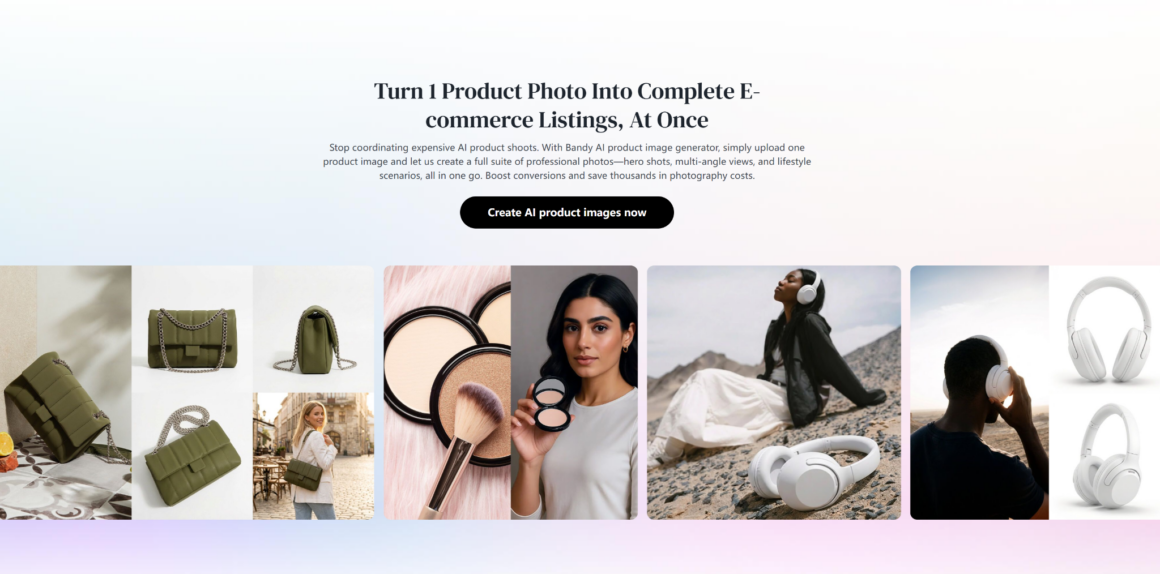
From Basic Photo to Full Campaign Assets
- Capture a simple product photo
- Flat lay, mannequin, or basic studio shot
- Use an AI background tool
- Generate multiple backgrounds: studio, seasonal, lifestyle
- Create platform-specific crops
- 1:1 for catalog, 4:5 for Instagram, 9:16 for ads and Reels
- Test and iterate
- See which visuals perform best, then generate more in the same style
This lets you get more mileage out of a single basic image.
On-Model Product Images Without a Full Shoot
- Start with clean product photos
- Clear, well-lit front and back images
- Generate on-model images using AI
- Select model types (age, skin tone, style) that match your audience
- Create variations
- Different poses, contexts (streetwear, office, gym, party)
- Deploy across your store
- Use on product pages, category pages, and lookbooks
This workflow is efficient for brands that launch many SKUs but don’t have budgets for constant on-model photography.
Concept Testing Before Production
- Use AI to visualize a concept
- New colorways, prints, or design details
- Create product mockups for landing pages or ads
- Test with small traffic
- Measure interest, clicks, and signups
- Refine designs before mass production
This reduces risk by aligning production more closely to real demand signals.
A Practical Example: Specialized Tools for Fashion
General AI tools can be powerful but often require a lot of tweaking. For fashion stores, vertical-specific platforms can be more efficient.
For instance, Bandy AI focuses on helping fashion and apparel brands generate realistic product and model images at scale. Instead of manually prompting a general image model each time, you can:
- Turn basic product shots into styled on-model images
- Create consistent backgrounds that match your brand’s aesthetic
- Quickly generate visuals for new colors or collections
Used this way, AI becomes a production partner: it doesn’t replace all photography, but it helps you fill gaps and keep your catalog visually consistent without constant reshoots.
Key Use Cases for Ecommerce Stores
1. Scaling Visuals for Large Catalogs
If you sell many variants (sizes, colors, patterns), AI helps you:
- Generate visuals for every variation
- Maintain a consistent look and feel
- Avoid gaps where certain variants only have low-quality or placeholder images
2. Improving Conversion Rate
Better images improve conversion. AI-generated visuals can support this by:
- Showing products in context (how they’re used or worn)
- Highlighting details (textures, features, size references)
- Providing multiple angles and close-ups without extra photoshoots
You can A/B test different visual styles (minimal vs. lifestyle, model vs. flat lay) to see what your customers respond to.
3. Ads and Social Media
Ads fatigue quickly if you reuse the same creatives. AI product image generators allow you to:
- Quickly produce new ad visuals from your existing catalog
- Match visuals to seasons, holidays, or trends
- Adapt creatives to different platforms and placements
Instead of running the same studio shot everywhere, you can test multiple creative angles at low cost.
4. International Expansion and Localization
For global stores:
- Adapt backgrounds to reflect local environments or seasons
- Adjust styling to match local tastes and culture
- Create region-specific campaigns without reshooting everything
This helps create a more relevant experience for different markets.
Limitations and Things to Watch Out For
AI product image generators are powerful, but not flawless.
- Realism issues: Hands, reflections, fine details, or complex patterns can sometimes look off.
- Fit and fabric behavior: For fashion, AI may not always represent drape, stretch, or transparency perfectly.
- Brand consistency: Over-experimentation can lead to visuals that no longer feel cohesive.
- Ethics and transparency: For on-model images, consider whether and how to disclose AI-generated visuals, especially where fit and expectations matter.
A good rule of thumb:
Use AI to extend and enhance your visual library, but don’t mislead customers about what they’ll actually receive.
AI product image generators are not about eliminating photography altogether. They are about making visual production more flexible, affordable, and responsive to your store’s needs. Used strategically, they can help you launch faster, test more, and present your products in the best possible light—without needing a full studio crew every time.